Surface Construction Elements
Specifying the physical properties of the building envelope is something every building model includes. The input objects in this group allow the specification of the different layers that make up exterior and interior walls, roofs, floors, windows, and skylights as well as the order of the materials in these surfaces. A large number of input objects appear in this group since there are many special features that need to be modeled for certain energy efficiency measures. The following is a list of only the most commonly used input objects.
- Material - the most common input object to describe the materials used in opaque constructions in walls, roofs, and floors and includes inputs for the thickness, conductivity, density, and specific heat as well as absorptances. See examples in ASHRAE_2005_HOF_Materials.idf located in the DataSets folder.
- Material:NoMass - used when the material only has thermal resistance and little thermal mass such as insulation. It should not be used to describe materials that do have significant thermal mass.
- Material:AirGap - used to describe when walls or roofs have an air gap. Note, this is modeled as a fixed resistance (with no internal convection or radiant transfer), and it cannot be used for windows.
- WindowMaterial:Glazing - describes the material used in the glass (or other transparent material) portion of the fenestration (windows and skylights). See WindowGlassMaterials.idf in the DataSets folder for examples.
- WindowMaterial:Gas - the type of gas used between layers of glass in windows and skylights has a significant impact on the heat transfer performance. See WindowGasMaterials.idf in the DataSets folder for examples.
- Construction - a list of materials (any from the list above plus others) in order from the outside to the inside making up the wall, roof, floor, window or skylight. Every input file will have several of these input objects. Examples of constructions for walls, roofs, and floors can be found in ASHRAE_2005_HOF_Materials.idf located in the DataSets folder while examples for windows and skylights can be found in WindowConstructs.idf in the same folder.
- WindowMaterial:SimpleGlazingSystem - the best way to describe a window is with a construction input object that references WindowMaterial:Glazing and WindowMaterial:Gas input objects but if all you have is the U-Factor and Solar Heat Gain Coefficient (SHGC) they can be specified in this input object.
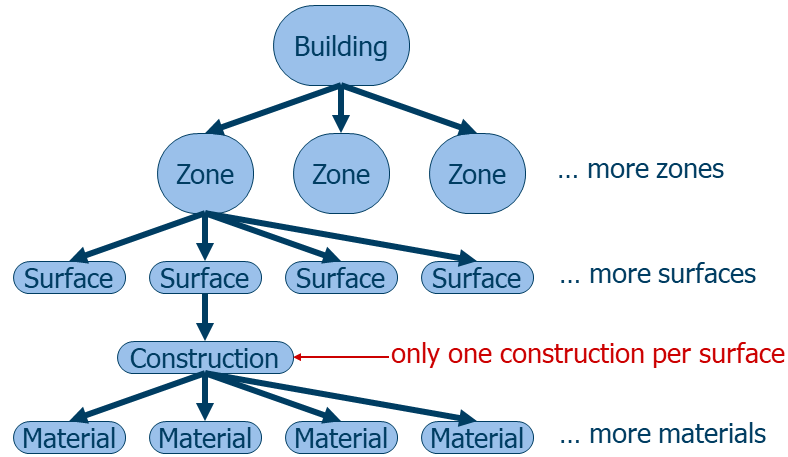
Envelope Component Hierarchy
A large variety of input objects in this group are not as commonly used but are key to modeling specific types of walls and windows so if what you are trying to model does not fall into the neat categories for the input objects described so far, there is still a good chance that EnergyPlus has an input object that will work. These other input objects include ones for walls and roof that can be used when modeling combined heat and moisture transfer, modeling materials which undergo a phase change to store heat in the wall or when the material properties change with temperature, when the material allows infrared radiation to flow through it, when modeling green (vegetated) roofs, for simplified C- or F-factor modeling, or when the wall includes resistance or hydronic tubing to provide heat. The other input objects to describe windows and skylights include input objects that can be used to describe thermochromic and electrochromic glazing, mixtures of gases between layers of glass, vacuum glazing, movable portions of the window assembly such as shades and blinds and screens, alternative ways of specifying fenestration such as equivalent layers or refraction extinction method or ASHWAT model or from a WINDOW program export/data file or specifying wavelength-by-wavelength properties.
The input objects described in this section are further explained in the InputOutputReference under the heading "Group-Surface Construction Elements."