What Are All These Folders?
The installation of EnergyPlus includes many different files in different folders:
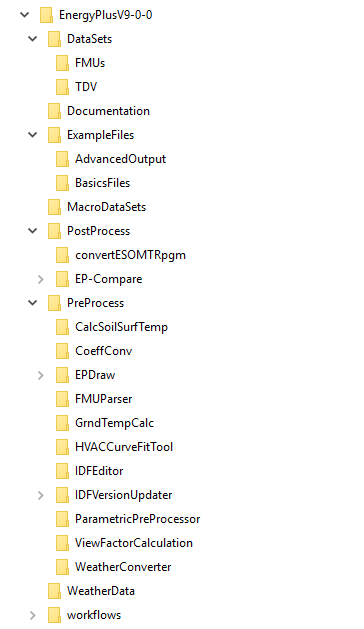
EnergyPlus Installation Folders
Many of these folders include valuable resources for using and learning EnergyPlus.
- The main folder includes the EnergyPlus executable which can be used on the command line and EP-Launch 2, a program that makes it easier to use EnergyPlus and the Energy+.IDD that describes each possible EnergyPlus input object and the default, minimum, maximum, and options for each field within each input object.
- The Documentation folder includes this document as well as the InputOutputReference, EngineeringReference, AuxiliaryPrograms, OutputDetailsAndExamples which are very important to understand. If you haven't looked through the documentation yet, take a few minutes and get familiar with it.
- The DataSets and MacroDataSets folders include files containing libraries of input objects that may be useful in constructing your own input files. The ASHRAE_2005_HOF_Materials.idf and WindowConstructs.idf files, for example, will help with defining walls and windows.
- The ExampleFiles folder includes a huge number of example files that are indexed in the two HTML files in that folder or can be searched through using most text editors.
- The Preprocess and PostProcess folders include many utilities that can be used directly or as part of EP-Launch that can aid in the setting up input files or extracting or converting results. The WeatherData folder includes a small sample of the many weather files that are available. For other weather files, please see the previous section on subsec:Weather-Files.