Versions and Updating
EnergyPlus version updates are released generally twice per year in March and September. Each version of EnergyPlus is installed to a unique folder, so it is possible, and recommended, to keep older versions in place when adding a new one. This is very helpful if you need to go back and make a change to an older project and don't want to introduce version-related changes in results. When using the IDF input file format with EnergyPlus, each release is likely to have small changes to the file format. Included with EnergyPlus are a number of ways to update files so that they are compatible with the release. Each method ultimately uses the TransitionVx-x-x-ToVx-x-x.exe files that are located in the Preprocess\IDFVersionUpdater folder. The ways to update your IDF files are:
- IDFVersionUpdater program (shown below) is included in the installation and works on multiple platforms. It is located in the Preprocess\IDFVersionUpdater folder. It can convert from EnergyPlus 7.2 to the most recent version, and even older versions can be converted if the proper files are requested from the helpdesk. It can also update a group of files. It is documented in the Chapter titled "Using Older Version Input Files - Transition" in the AuxiliaryPrograms document.
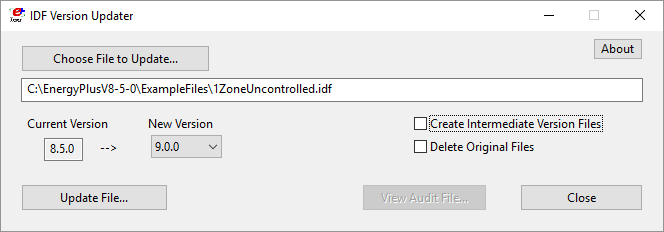
IDFVersionUpdater
- EP-Launch 2 - The Windows-only program that comes with the EnergyPlus installation can update a single file from the just previous version of EnergyPlus by using the File...Transition command.
- EP-Launch 3 - The program for Windows, Linux, and MacOS can update a single file across multiple versions using the Transition workflow.
- Command line Transition - This allows updating files using the command line such as the Terminal for MacOS and Linux or the CMD or PowerShell for Windows. It is documented in the Chapter titled "Using Older Version Input Files - Transition" in the AuxiliaryPrograms document.